Claude Cowork
Learn how Claude Cowork automates multi-step workflows using your files. Explore key features, top use cases, and tips to get started with Anthropic's tool.


Claude Cowork: What It Is, How It Works & Use Cases
Claude Cowork is a feature from Anthropic that lets Claude work on tasks using files and information on your computer. Instead of only answering questions in a chat, Cowork is designed to handle larger, multi-step tasks such as researching information, analyzing documents, creating files, and organizing work.
Claude Cowork offers an interesting way to work with files and complete multi-step knowledge tasks. If you want extend these workflows see all skills for Claude Code and Cowork and explore reusable instructions for more specialised tasks.
Claude Cowork works directly with Skills by Anthropic, using them as core building blocks to automate multi-step workflows across your local files, folders, and apps. Claude Skills are reusable instruction packages that teach Claude how to perform specific, repeatable tasks and workflows automatically.
This guide explains what Claude Cowork is, how it works, what you can do with it, and how to get started.

What Is Claude Cowork?
Claude Cowork is a workspace that allows Claude to complete more complex tasks using files and other resources available to it.
With regular AI chat, you usually ask a question and receive an answer. With Cowork, you can give Claude a larger task and let it work through multiple steps to produce a result.
For example, instead of asking Claude to summarize one document, you could give it several files and ask it to review them, find important information, organize the findings, and create a new report.
What Makes Claude Cowork Different?
The main difference is how the task is handled.
A normal Claude conversation is often focused on questions, answers, writing, and analysis within the chat. Cowork is designed for tasks that involve working with files and completing several related steps.
This makes Cowork useful when the final result requires more than a simple answer.
Who Can Use Claude Cowork?
Claude Cowork is designed for people who want help completing computer-based work with AI. It can be useful for:
- Content creators
- SEO professionals
- Marketers
- Researchers
- Students
- Business teams
- Data analysts
- Anyone who regularly works with documents and files
Availability and features can depend on the Claude plan and the current version of Cowork.
How Does Claude Cowork Work?
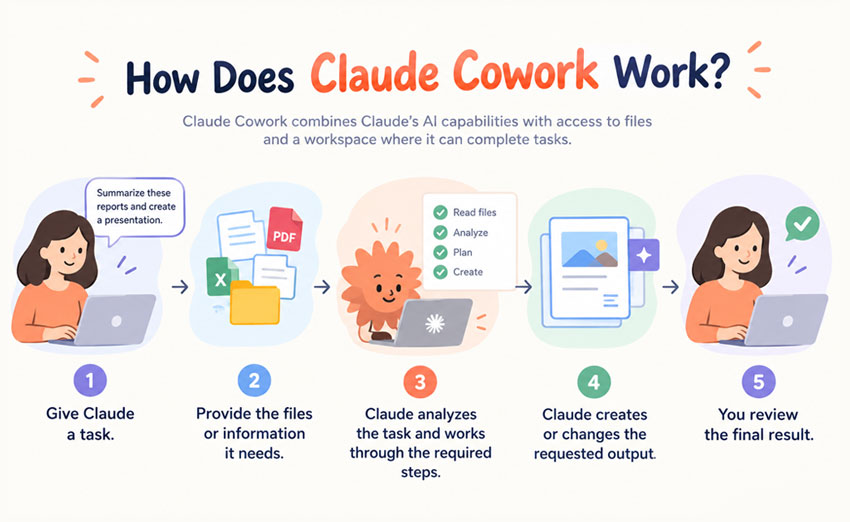
Claude Cowork works by combining Claude's AI capabilities with access to files and a workspace where it can complete tasks.
The basic process is simple:
- Give Claude a task.
- Provide the files or information it needs.
- Claude analyzes the task and works through the required steps.
- Claude creates or changes the requested output.
- You review the final result.
For example, you could provide a folder containing research documents and ask Claude to identify the most important findings and create a summary.
How Cowork Works With Files
Files are an important part of Cowork. Depending on the supported features and permissions, you can use files as the source material for a task. Claude can then read, analyze, organize, or transform that information.
For example, you might ask Cowork to:
- Summarize several documents
- Compare information across files
- Extract important data
- Organize research
- Create a report from existing material
- Rewrite documents
- Analyze spreadsheets
Always check the current Claude documentation for supported file types, limits, and permissions because these can change over time.
How Users Give Cowork Tasks
The best way to use Cowork is to describe the goal clearly. A useful instruction should explain:
- What you want Claude to do
- Which files it should use
- What the final result should look like
- Any important rules or requirements
For example:
Review the files in this folder, identify the main topics, group similar information together, and create a clear research summary.
A specific instruction gives Claude a clearer target and can reduce the amount of manual correction needed later.
What Can Claude Cowork Do?
Claude Cowork can help with many tasks involving research, documents, data, content, and organization. Its biggest advantage is that it can work through tasks that contain multiple steps.
Research
Cowork can help organize and analyze research material. You can use it to:
- Review research documents
- Summarize information
- Compare documents
- Find important themes
- Organize research notes
- Create research summaries
If your task requires information from external sources, make sure the sources are available to Claude or verify important information independently.
Create and Edit Documents
Cowork can help create new documents or work with existing ones. Examples include:
- Reports
- Content drafts
- Research summaries
- Business documents
- Planning documents
- Briefs
- Internal documentation
You can also ask Claude to improve an existing document by changing its structure, tone, formatting, or clarity.
Analyze Files and Data
Cowork can help make large amounts of information easier to understand. For example, it can help you:
- Review spreadsheet data
- Find patterns
- Summarize results
- Compare information
- Organize datasets
- Create written explanations of data
The exact capabilities depend on the file type and the tools available in your Cowork environment.
Complete Multi-Step Tasks
One of the main reasons to use Cowork is for tasks that require several actions. For example, a marketing task might involve:
- Reviewing existing content
- Finding common topics
- Organizing the information
- Identifying gaps
- Creating a new content plan
Instead of handling each step separately, you can give Claude the overall goal and let it work through the task.
Organize Work
Cowork can also help organize files and information. For example, you could use it to structure research materials, organize documents, create summaries, or turn unstructured information into a more useful format.
How Can Claude Cowork Help Graphic Designers?
Claude Cowork is designed for knowledge work, not image editing. For graphic designers that work with Photoshop or other Photoshop alternatives, its main role is to help manage the information and files around the creative process.
- Organize project files and research — Keep project information, references, and documents structured and easy to find.
Structure creative briefs — Turn project requirements and ideas into clear, organized briefs.
- Manage client feedback — Turn feedback into clear tasks and action points.
- Create project checklists — Prepare checklists for revisions, approvals, and final delivery.
- Build reusable workflows — Use Skills to provide reusable instructions for recurring design-related tasks.
A simple division of responsibilities looks like this:
- Photoshop: Create, edit, and refine visual assets.
- Claude Cowork: Organize files, process information, and support project tasks.
- Skills: Provide reusable instructions for recurring workflows.
- Designer: Make creative decisions and approve the final work.
Cowork helps me organize my Photoshop projects and to optimize my time management while working on different tasks.
How to Use Claude Cowork
Using Claude Cowork starts with a clear goal and the right files.
Step 1: Open Claude Cowork
Open Claude and access Cowork if it is available on your account. The interface and availability may change as Anthropic updates the product.
Step 2: Choose or Provide Your Files
Add the files or information Claude needs for the task. Before starting, make sure you are giving Claude the relevant material. Unnecessary files can make the task less focused.
Step 3: Give Claude Clear Instructions
Tell Claude exactly what you want to achieve.
❌ A weak instruction might be: Analyze these files.
✔️ A better instruction would be: Review these files and create a three-section report. Identify the main findings, highlight important differences between the documents, and finish with five key takeaways.
The second instruction gives Claude a clear goal and output format.
Step 4: Let Cowork Complete the Task
Once the task is clear, Claude can work through the requested steps. For larger tasks, the process may take longer than a normal chat response because Claude is doing more work.
Step 5: Review the Results
Always review the final output before using it. AI can make mistakes, misunderstand instructions, or produce incorrect information. This is especially important for business decisions, research, financial information, legal content, or other work where accuracy matters.
Claude Cowork Use Cases
Claude Cowork can be useful in many different types of work.
SEO and Content
SEO professionals and content teams can use Cowork to help with tasks such as:
- Keyword research organization
- Content briefs
- Content audits
- Competitor content analysis
- Content editing
- Topic organization
- SEO reports
For example, you could give Cowork a collection of existing articles and ask it to identify common topics, missing subjects, and opportunities for new content.
Marketing
Marketing teams can use Cowork to organize information and create marketing materials. Possible tasks include:
- Campaign research
- Competitor analysis
- Marketing reports
- Content planning
- Customer research
- Campaign documentation
Cowork can be particularly useful when information is spread across many documents.
Research
Researchers can use Cowork to process and organize large amounts of written information. For example, you can use it to:
- Summarize documents
- Compare research notes
- Group information by topic
- Extract important points
- Create research summaries
- Organize source material
The output should still be checked against the original sources when accuracy is important.
Business Tasks
Cowork can help with everyday business work involving documents and information. Examples include:
- Creating reports
- Organizing business documents
- Summarizing meetings or notes
- Preparing internal documentation
- Creating project plans
- Reviewing files
- Organizing information
This can reduce the amount of repetitive manual work involved in preparing documents.
Data Analysis
Cowork can also help people work with data. Possible tasks include:
- Reviewing spreadsheets
- Summarizing data
- Finding trends
- Comparing datasets
- Explaining results
- Turning data into written reports
For important decisions, treat AI-generated analysis as a starting point and verify the underlying data and calculations.
Claude Cowork FAQ
What is Claude Cowork?
Claude Cowork is a Claude workspace designed for completing larger, multi-step tasks using files and other information. Instead of only answering individual questions, Cowork can help analyze files, create documents, organize information, and work through a complete task.
How does Claude Cowork work?
You give Claude a goal and provide the files or information needed for the task. Claude then works through the requested steps and produces an output for you to review.
What can Claude Cowork do?
Claude Cowork can help with research, document creation, editing, file analysis, data analysis, organization, content work, and other multi-step tasks. Working with files is one of the main purposes of Cowork. You can provide files for Claude to analyze, summarize, organize, or use as part of a larger task. Its exact capabilities depend on the features and permissions available in the current version.
Is Claude Cowork free?
Claude Cowork availability and pricing depend on Anthropic's current plans and product offerings. Check the latest Claude pricing information before publishing or relying on a specific price.
What is the difference between Claude and Claude Cowork?
Claude is the broader AI assistant, while Cowork is designed for completing more involved tasks using files and a workspace. In simple terms, a normal Claude chat is often better for direct questions and conversations, while Cowork is designed for more structured, multi-step work.
Is Claude Cowork safe to use?
Cowork should be used with the same care you would use with any AI tool. Review permissions, understand how your information is handled, and avoid sharing sensitive information unless you understand the applicable privacy and security settings. Always verify important results before using them.
Conclusion
Claude Cowork is designed to make AI more useful for real-world computer-based work. Instead of asking Claude to complete one small task at a time, you can give it a larger goal and provide the files and information it needs.
It can help with research, content, SEO, marketing, documents, data analysis, and file organization. The biggest benefit is its ability to handle tasks that involve multiple steps. Cowork and skills from agensi.io can help manage the briefs, files, feedback and delivery requirements surrounding those activities, while skills can make successful organisational procedures reusable across future projects.
However, Cowork should not replace human review. AI-generated work can contain errors, so important information should always be checked.
For people who regularly work with documents, research, data, and repetitive tasks, Claude Cowork can be a useful way to save time and make complex work easier to manage.
Photoshop Alternatives
No comment(s) for "Claude Cowork"