Online Photoshop Alternatives
Looking for a free browser-based photo editor? Compare the best online Photoshop alternatives of 2026 -including Photopea, MockoFun, Pixlr, and Canva - for AI editing, PSD support, and beginners.

Free Photoshop Alternatives Online (2026)
Looking for free online Photoshop alternatives? Whether you need a free online photo editor or an AI-powered design tool, there are excellent options available.
Online Photo Editing Software Free like Photoshop Compared
| Tool | Free | Online | Easy to Use | PSD Support | AI Tools | Best for |
|---|---|---|---|---|---|---|
| Photopea | ✔ | ✔ | Difficult | ✔ | Limited | Photoshop replacement |
| MockoFUN | ✔ | ✔ | Very easy | Basic | ✔ | Photo editing, text effects & graphic design |
| Pixlr | ✔ | ✔ | Easy | Partial | ✔ | Quick image edits, marketing graphics |
| SumoPaint | ✔ | ✔ | Moderate | No | Limited | Browser-based painting & photo editing |
| Polarr | ✔ | ✔ | Moderate | No | ✔ | Photo filters & AI enhancements |
| Adobe Express | ✔ | ✔ | Very easy | No | ✔ | Social graphics & AI content creation |
| Canva | ✔ | ✔ | Very easy | No | ✔ | Social media & presentations |
| Fotor | ✔ | ✔ | Easy | No | ✔ | AI photo editing & design |
| BeFunky | ✔ | ✔ | Easy | No | ✔ | Collages & easy photo editing |
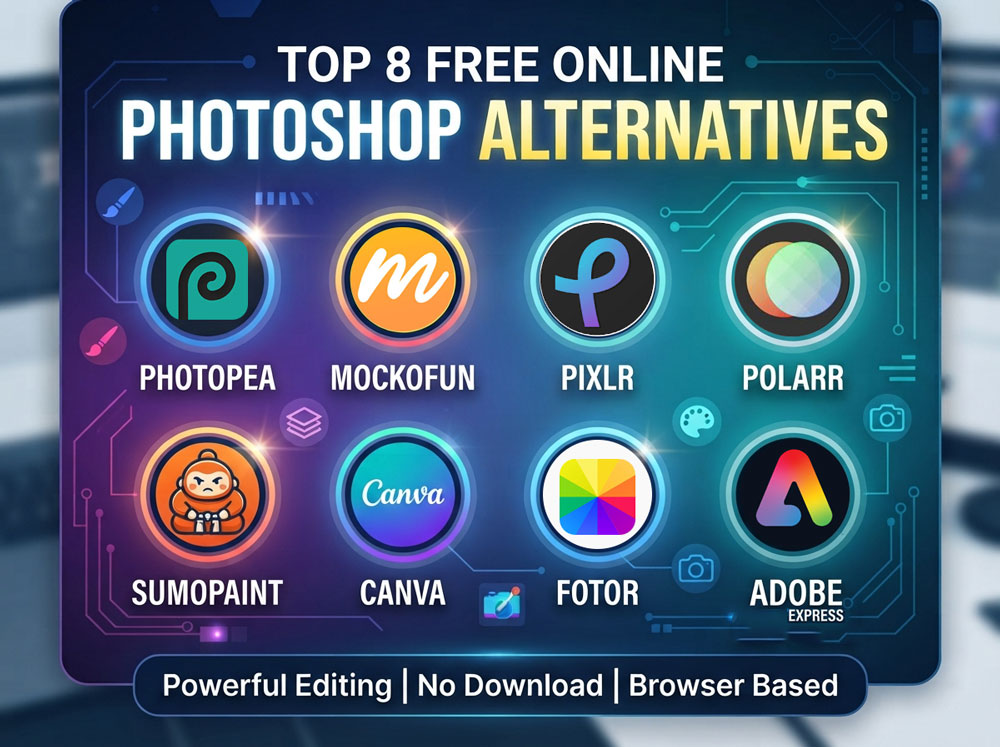
Some of these Photoshop online alternatives focus on professional photo editing, while others make graphic design or AI-powered editing easier for beginners.
In this guide, we compare the 9 best online Photoshop alternatives based on features, PSD compatibility, ease of use, AI tools, strengths, limitations, and ideal users and give each an overall score. If you need the best Photoshop alternatives for web and desktop check out this complete list.
1. Photopea — Best for PSD Editing (96%)
Best Overall Photoshop Alternative Online
Photopea is one of the the closest browser-based alternatives to Photoshop. It provides advanced editing tools inside a web browser and supports professional formats such as PSD. If you want to use Photoshop online free without download, this tool is an excellent choice.
Features:
- PSD file support
- Layer-based editing
- Layer masks
- Smart Objects
- Adjustment layers
- Filters and effects
- Vector editing tools
✅ Pros:
- Most similar workflow to Photoshop
- Works without installation
- Supports professional file formats
- Suitable for advanced editing
Cons:
- Interface can feel complex for beginners
- Free version includes advertisements
Best For: Photoshop users, Designers working with PSD files, Advanced photo editing
2. MockoFun — Best for Beginners (86%)
Best Photoshop Alternative Online for Beginners
MockoFun is a beginner-friendly online photo editor like Photoshop and graphic design tool focused on creating visual content quickly. It combines image editing with templates, typography, and creative design features. MockoFun is one of the best browser photo editor that you can find for free.
Features:
- Photo editing tools
- Adjustment layers
- Non-destructive smart photo filters
- Layers and Layer masks
- Clipping masks
- Blending modes
- Background removal
- Transparent PNG download
- Fonts & Text effects
- Shapes and icons
- Graphic design templates
- AI-powered creative tools
✅ Pros:
- Easy learning curve
- Designed for non-designers
- Strong typography features
- Fast browser-based workflow
Cons:
- Opens PSD files with limitations
- Not built for professional photo manipulation
- Fewer advanced editing controls than Photoshop
Best For: Beginners, Students, Bloggers, Social media creators, Small businesses
3. Pixlr — Best for AI Editing (81%)
Best AI-Powered Online Photo Editor
Pixlr combines traditional photo editing with artificial intelligence tools, making it useful for users who want fast edits without learning complex software.
Features:
- AI background removal
- AI image generation
- Object removal
- Photo filters
- Layer editing
- Design templates
✅ Pros:
- Fast AI-assisted editing
- Simple interface
- Good balance between editing and design tools
Cons:
- Some AI features require payment
- Advanced workflows are limited
Best For: Quick photo editing, Content creators, Marketing graphics
4. SumoPaint (76%)
Best Online Drawing Alternative
SumoPaint has strong digital painting/illustration options, but it is also a layer-based raster editor with many Photoshop-like tools.
Features:
- Digital brushes
- Drawing tools
- Layers
- Basic filters and adjustments
- Masks and blend modes
- Painting effects
✅ Pros:
- Good for creative drawing
- Works directly in browser
Cons:
- Not focused on photo editing
- Limited Photoshop-style tools
Best For: Artists, Digital painting beginners
5. Polarr (65%)
Best Online Tool for Color Editing
Polarr specializes in photo filters and professional-looking color adjustments.
Features:
- Color correction
- Custom filters
- LUT support
- Presets
- Portrait adjustments
✅ Pros:
- Strong color editing controls
- Good for photography workflows
Cons:
- Not suitable for graphic design
- Requires some editing knowledge
Best For: Photographers, Photo enthusiasts
6. Adobe Express (60%)
Best Simple Adobe-Based Online Editor
Adobe Express provides simplified Adobe editing tools through a browser interface. It focuses on quick content creation rather than advanced Photoshop workflows.
Features:
- AI-powered editing
- Templates
- Image resizing
- Background removal
- Adobe ecosystem integration
✅ Pros:
- Trusted Adobe technology
- Easy for beginners
- Good branding tools
Cons:
- Advanced features require paid plans
- Less control than Photoshop
Best For: Adobe users, Marketing teams, Quick content creation
7. Canva (55%)
Best Online Photoshop Alternative for Graphic Design
Canva is mainly a visual design platform rather than a Photoshop replacement. It is ideal for creating graphics, presentations, and social media content.
Features:
- Design templates
- Drag-and-drop editor
- Background remover
- Brand kits
- AI design tools
- Collaboration features
✅ Pros:
- Extremely beginner-friendly
- Large template library
- Easy team collaboration
Cons:
- Limited advanced photo editing
- Less suitable for professional image manipulation
Best For: Beginners, Businesses, Social media managers
8. Fotor (45%)
Best Online Editor for Portrait Enhancement
Fotor focuses on improving photos quickly, especially portraits and social media images.
Features:
- AI photo enhancement
- Portrait retouching
- Filters
- Batch editing
- Image effects
✅ Pros:
- Simple editing process
- Good automatic improvements
Cons:
- Not designed for advanced design work
- Many features require premium access
Best For: Portrait editing, Casual photographers, Social media users
9. BeFunky (40%)
Best Simple Photo Editor Online
BeFunky is designed for users who need quick edits without complicated tools.
Features:
- Basic photo adjustments
- Collage maker
- Effects
- Templates
- Graphic design tools
✅ Pros:
- Easy to use
- Fast editing workflow
Cons:
- Limited professional features
- Less flexibility for advanced users
Best For: Casual users, Students, Simple projects
Online Photoshop Alternatives: Best For
Finding good Photoshop alternatives online is easier than ever. Modern browser-based editors can handle photo editing, graphic design, AI tools, templates, and even professional workflows without requiring software installation.
| Need | Best choice |
| Closest Photoshop replacement | Photopea |
| Best for beginners (photo editing & graphic design) | Mockofun |
| Best AI-powered editor | Pixlr |
| Best for social media templates | Canva |
| Best for digital painting | Sumo Paint |
| Best for quick visuals | Adobe Express |
Whether you are a beginner creating social media graphics or a designer looking for a lightweight Photoshop replacement, these online editors provide different solutions depending on your needs. When choosing Photoshop alternatives you must consider:
- Price
- Ease of use
- Features
- PSD compatibility
- AI tools
- Best use cases
- Overall score
How We Tested and Scored These Online Photoshop Alternatives
We tested these Photoshop alternatives for common image editing tasks. We looked at how easy they are to use, what editing tools they offers, how well they works with PSD files, their AI features and what you can actually do with the free version. We tested each editor using the same tasks: opening a PSD, removing a background, adding photo filters, working with layers/masks, adding text, resizing an image and exporting PNG/JPG.
The final score is based on five areas:
- Editing tools – 30%: layers, masks, selections, filters, adjustments and other tools you would normally use in Photoshop.
- Ease of use – 20%: how easy it is to learn, find tools and complete common editing tasks.
- PSD support – 20%: how well the editor can open, edit and save Photoshop PSD files. We chose PSD files with different complexity levels like smart objects, layer styles, etc.
- Free version – 20%: how useful the editor is without paying, including free exports and important feature limits.
- AI tools – 10%: features such as background removal, object removal, image generation and other AI-assisted editing.
We used the same criteria for every editor. The scores are meant to make comparison easier, but the highest score is not always the best choice for everyone. For example, one editor may be better for PSD editing, while another may be easier for beginners or better for graphic design.
Frequently Asked Questions About Online Photoshop Alternatives
What is the best online Photoshop alternative?
Photopea is the closest replacement because it supports PSD files, layers, masks, and many Photoshop features directly in your browser. I consider Photopea #1 in the list of best free alternatives to Photoshop.
Which Online Photoshop Alternatives Should You Choose?
The answer to "what are the best alternatives to Photoshop" depends on which exact Photoshop features you are looking for. Different alternatives are better suited for different Photoshop workflows.
- Choose Photopea if: You know Photoshop, you work with PSD files, you need professional tools.
- Choose MockoFun if: You're a beginner, you need quick photo editing, you design YouTube thumbnails, posters or social media graphics, you want an easy browser editor.
- Choose Canva if: You mainly create marketing content.
- Choose Pixlr if: You want AI editing features.
- Choose Adobe Express if: You already use Adobe Creative Cloud.
Are there free Photoshop alternatives online?
Yes. Photopea, MockoFun, Pixlr, Canva, and SumoPaint all offer free plans with useful editing features.
Which online editor is easiest for beginners?
MockoFun and Canva are among the easiest options. Their interfaces are simple, include ready-made templates, and require little learning. MockoFun is best for photo editing and composition, graphic design, text effects, etc. while Canva is great for creating social media content and has lots of pre-made templates.
Can online editors replace Photoshop?
For everyday tasks such as social media graphics, blog images, basic photo editing, and simple design work, yes. Professional print production, advanced compositing, and complex retouching still favor Photoshop.
How to edit PSD file online without Photoshop?
You can edit a PSD file online for free using Photopea, which is one of the most powerful browser-based alternatives to Adobe Photoshop. It supports opening, editing, and exporting PSD files while preserving most layers and effects.
Final Verdict
🎨 If your goal is a true Photoshop replacement, Photopea is in the top of the list of Photoshop alternatives online.
✨ If you want the easiest online editor for making photo edits, graphics, thumbnails, blog images, and marketing materials, MockoFun is among the best Photoshop alternatives online.
🤖 For AI-powered editing, Pixlr and Adobe Express are strong contenders, while Canva remains one of the best all-around tools for beginners.
⭐ My favorite tool in the online Photoshop alternatives for beginners category is MockoFun. I use Mockofun for quick photo edits like adjustments, filters, cropping, resizing, etc. The only downside is that I can not open and edit my old PSD files.
If you want to learn more about Photoshop, its newer versions, here is a list with all the Photoshop versions and a short history of this iconic tool.
Cloud Consulting
Photoshop Alternatives
No comment(s) for "Photoshop Alternatives Online"